Mastering the Turquoise Color Palette with Hex Codes
In the realm of visual identity, few colors offer the same psychological balance as turquoise. It sits at the intersection of blue’s stability and green’s growth, creating a hue that feels refreshing, sophisticated, and inherently trustworthy. For small business owners and solopreneurs, selecting a Turquoise Color Palette with Hex Codes is not just about picking a pretty color; it is a strategic move to define a brand personality that communicates clarity, creativity, and calm authority. Whether you are designing a logo, curating a social media feed, or packaging a physical product, turquoise is a versatile asset that adapts to various industries without losing its distinct voice.
The Psychology and Personality of Turquoise
Understanding the visual characteristics of this color family is essential for effective branding. Turquoise is often associated with open communication, emotional balance, and healing. It evokes the imagery of tropical waters and precious stones, lending an air of luxury and relaxation to any design. Unlike the aggressive urgency of red or the stark minimalism of black, a turquoise palette invites the viewer in, suggesting that your brand is accessible yet professional.
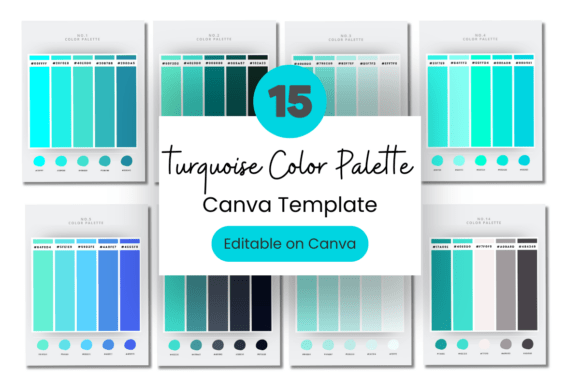
When you utilize a Turquoise Color Palette with Hex Codes, you are working with a spectrum that ranges from deep, teal-like aquamarines to pale, icy cyans. This range allows for incredible flexibility. A darker shade like #008080 (Classic Teal) conveys depth and seriousness, making it ideal for law firms or financial consultants wanting to appear modern yet grounded. Conversely, a lighter tint like #E0FFFF (Light Cyan) suggests openness and innovation, perfect for tech startups, wellness apps, or wedding planners. The hex code system is vital here; it ensures that the exact shade you choose for your logo in Canva translates perfectly to your website CSS, maintaining absolute consistency across all touchpoints.
Strategic Applications: Where Turquoise Shines
The utility of turquoise extends far beyond simple background colors. As a creative professional, I recommend using this palette to influence visual hierarchy and audience engagement. Because turquoise is a cool color, it recedes naturally, making it an excellent backdrop for darker typography or vibrant accent colors like coral or gold. This creates a clean visual hierarchy that guides the viewer's eye exactly where you want it to go.
1. Brand Identity and Logo Design
For a small business, a Turquoise Color Palette can serve as the cornerstone of your visual identity. It works exceptionally well for brands in the health, beauty, travel, and finance sectors. If you are a solopreneur, consider using a deep turquoise as your primary brand color to establish trust, and a lighter variant for call-to-action buttons. This monochromatic approach looks highly professional and requires minimal effort to execute, especially when using editable templates.
2. Digital Marketing and Web Design
In web design, readability is king. Turquoise offers a softer alternative to pure blue links or headers, reducing eye strain for your visitors. It pairs beautifully with neutral grays and crisp whites, creating a modern aesthetic that feels clean and uncluttered. For social media graphics, turquoise is a scroll-stopper. It pops against the typical beige and white backgrounds of Instagram or Pinterest without being jarring. A consistent use of hex codes ensures your grid looks cohesive, which is a key factor in growing a following.
3. Packaging and Print
If you sell physical products, turquoise packaging signals quality. It suggests that the product inside is fresh, natural, or premium. When printing, the specificity of hex codes allows you to communicate precisely with print shops to avoid color shifts. You can specify CMYK conversions based on your hex values to ensure your business cards, thank-you cards, and product boxes match your digital presence perfectly.
Practical Guide to Using Your Canva Template
Acquiring a Turquoise Color Palette with Hex Codes is the first step, but applying it effectively is where the magic happens. Our template is designed specifically for Canva, the accessible software that levels the playing field for non-designers. However, having the tool is different from mastering the strategy. Here is how to get the most out of your asset:
Evaluating Project Fit and Font Pairings
Before you apply the colors, consider your typography. Turquoise is a versatile partner for many font styles. It pairs exceptionally well with clean sans serif fonts like Montserrat or Open Sans for a modern, tech-forward look. If your brand leans more traditional or luxurious, try pairing your turquoise accents with a classic serif font like Playfair Display. The contrast between the geometric nature of turquoise and the organic strokes of a serif creates a dynamic visual tension. Avoid using turquoise for large blocks of body text; it can be difficult to read on screens. Instead, use it for headers, sub-headers, buttons, and graphic elements.
Testing and Customization
Once you open the Canva link, do not just accept the default layout. The "Fully Editable" nature of the template means you should experiment. Try placing a light turquoise background behind a white logo, or use a dark teal text on a cream background. Because the template uses free Canva elements, you never have to worry about hidden costs when you download your final PNG or PDF. Test your color combinations in grayscale to ensure there is enough contrast for accessibility. Good design is inclusive design; ensure your text stands out clearly against the turquoise backgrounds so that all potential customers can read your message.
Consistency is Key
The biggest mistake small business owners make is inconsistency. By using the provided hex codes, you lock in your brand colors. Save these codes in your brand kit within Canva or your website builder. When you create a newsletter, a flyer, or an Instagram story, pull from these exact codes. This repetition builds brand recognition. Over time, your audience will begin to associate that specific shade of turquoise with your business, creating a subconscious connection that fosters loyalty.
Ultimately, a Turquoise Color Palette is more than just a set of numbers and colors; it is a visual language. It tells your audience that you are reliable, creative, and professional. By leveraging these hex codes and the flexibility of Canva, you empower yourself to build a brand identity that is not only beautiful but strategically sound.